To add keywords to Squarespace, put them in six places: the SEO Title and SEO Description in each page’s settings, the page’s H1 heading, the URL slug, the image alt text, and the first hundred words of body copy. Site-wide defaults live under Settings, then Marketing, then SEO Appearance.
That is the mechanical answer, and Google’s AI Overview will give you the same list. What it will not tell you is that one of Squarespace’s most keyword-looking features does nothing for search at all, and that the field most sites leave empty is the one that decides whether anyone clicks.
Where exactly do keywords go in Squarespace?
Six locations, ranked by how much they actually matter:
| # | Location | Where to find it | Impact |
|---|---|---|---|
| 1 | SEO Title | Page Settings → SEO tab | Highest. This is what shows in search results. |
| 2 | H1 heading | The page itself, set as Heading 1 | High. Tells Google the page’s subject. |
| 3 | First 100 words | Body copy | High. Establishes topic immediately. |
| 4 | URL slug | Page Settings → General | Moderate, and permanent unless you redirect. |
| 5 | Image alt text | Click image → alt text field | Moderate, and free local relevance. |
| 6 | SEO Description | Page Settings → SEO tab | No direct ranking effect, decides click-through. |
To reach page settings: open Website, hover the page name, click the gear icon, then the SEO tab. Site-wide title formats and the default description live under Settings → Marketing → SEO Appearance.
Keep SEO titles to roughly 50 to 60 characters and descriptions to 150 to 160, because Google truncates beyond that.
Do Squarespace tags help SEO?
No. This is the trap.
Squarespace has a Tags feature on blog posts and products, and it looks exactly like a keyword field. It is not one. Tags are an internal organisation tool, they power category and tag pages, filtering and navigation within your own site. They do not tell Google what your page is about.
Worse, on some sites tags generate thin archive pages: a page holding one post, with almost no unique content, competing with the real post for the same search. That is a genuine duplicate-content problem, created by a feature people use *because* it looks like SEO.
Use tags if you want visitors to filter your blog. Do not use them expecting rankings. The keyword work happens in the six fields above.

What about the old keywords meta tag?
Ignore it entirely. Google does not read it.
Google’s own current documentation states plainly that “The meta-keyword tag is not used by Google Search, and it has no effect on indexing and ranking at all”. That position was first published in September 2009 and has not changed since.
Squarespace does not give you a keywords meta tag field, and that is a feature rather than an omission. If you find advice telling you to inject one through code injection, it is sixteen years out of date. The same question comes up constantly on WordPress, which I covered in how to add meta keywords in WordPress without a plugin.
The field most Squarespace sites leave empty
The SEO Description, on every page except the homepage.
Leave it blank and Squarespace, or Google, will pull an arbitrary fragment of your page as the snippet. Sometimes that is fine. Often it is a navigation label, a cookie notice, or the middle of a sentence.
That text is the last thing a person reads before deciding whether to click your result or the one below it. It does not influence your ranking directly, but it heavily influences whether the ranking earns you anything.
Writing one per page is dull, mechanical work that takes a couple of minutes each. On a fifteen-page site that is under an hour, and it is the highest-return hour available on most Squarespace builds.
How many keywords should one page target?
One, plus the phrasings that mean the same thing.
“Wedding photographer Bristol” and “Bristol wedding photographer” are the same query to Google and belong on one page. “Wedding photography” and “family photography” are different searches and need different pages.
The most common structural mistake on Squarespace is a single Services page listing six offerings, each getting a paragraph. That page ranks well for none of them, because Google cannot determine its primary subject. Six pages, one per service, each with its own SEO title and its own H1, will each rank for what they are about.
Does keyword stuffing still get penalised?
Repeating a phrase to hit a density target reads badly to humans and is discounted by search engines. There is no target percentage worth chasing.
What works instead is coverage: answer the question thoroughly, use natural variants where they fit, and let related terms appear because the subject genuinely requires them. A page about Squarespace SEO will naturally contain “SEO title”, “meta description”, “alt text” and “slug” without anyone forcing them in.
A practical check: read the page aloud. If a phrase sounds odd in speech, it is stuffed.
What Squarespace does automatically, and what it does not
Worth knowing so you spend effort in the right place:
| Handled for you | Left to you |
|---|---|
| XML sitemap at /sitemap.xml | Every SEO title |
| Canonical tags | Every SEO description |
| SSL certificate | All alt text |
| Responsive image sizes | Heading structure |
| Mobile rendering | URL slugs |
| Basic crawlability | Structured data beyond one WebSite node |
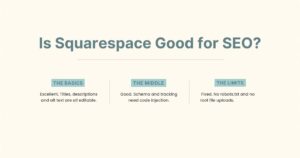
That last row is the one that surprises people. Squarespace’s automatic structured data output is a single JSON-LD block containing one WebSite node with a name and a URL. No Organization, no LocalBusiness, no Article. Anything richer has to be hand-written and injected.
The broader platform picture is covered in is Squarespace good for SEO.
Frequently asked questions
Artists setting up a portfolio will find the gallery and image settings covered step by step in the Squarespace for artists setup guide.
Open Website, hover the page, click the gear icon, then the SEO tab. Add your SEO Title and SEO Description there. Then set the page’s main heading as Heading 1 with your keyword in it, and use the keyword naturally in the first hundred words.
Two places. Site-wide: Settings → Marketing → SEO Appearance. Per page: Page Settings → SEO tab. Blog posts have the same SEO tab inside the individual post’s settings.
They are internal organisation tools, not ranking signals. They can also create thin archive pages that compete with your real content. Use them for navigation, not for search.
It is the meta description: the text that appears under your title in search results. It has no direct ranking effect but determines whether people click. Squarespace leaves it blank by default on every page.
Around 50 to 60 characters. Beyond that Google truncates it, and the part it cuts is usually the part you cared about.
Yes, through alt text. Click the image, then the alt text field, and describe what is actually in the picture, naming the place where relevant. Descriptive filenames before upload help too.
The short version
Six fields: SEO Title, H1, first hundred words, URL slug, alt text, SEO Description. Site-wide defaults under Settings → Marketing → SEO Appearance, per-page values in the SEO tab.
Skip the Tags feature for SEO purposes, ignore the keywords meta tag entirely, and write an SEO Description for every single page. One page, one keyword, and enough patience to do the boring hour of fields.
Want it done for you? I do Squarespace design and technical SEO for professionals, including the structured data Squarespace does not generate. See how I work as a Squarespace website designer.